Deconstructing Z-index
Understanding the common misconceptions and CSS behavior.
UI bugs haunt even the best developers. Why? Because unlike backend issues, debugging UI problems goes beyond fixing code. It’s about ensuring what users see and interact with, is flawless. UI bugs, influenced by factors like screen size, browser version, or even a user’s device, can frustrate users, damage brand perception, and cost conversions. Even seemingly simple styling issues can snowball into major problems.
One area where these challenges become apparent is in styling web pages. CSS can be complex and nuanced, and misunderstandings or misuse of its properties often result in significant debugging efforts.
“A common source of UI confusion is the z-index property. Understanding the fundamental behavior and workings of z-index is crucial. Without a solid grasp of how z-index operates, developers can easily encounter unexpected layout issues, where elements do not layer as intended.”
Z-Index Property
_“The z-index CSS property sets the z-order of a positioned element and its descendants or flex and grid items. Overlapping elements with a larger z-index cover those with a smaller one.” _— MDN
I encourage you to read the definition multiple times until it truly sinks in. The definition itself explains everything, but we often overlook its details when writing code.
This property plays a crucial role in controlling the stacking order of elements on a webpage. However, its behavior can be influenced by various factors such as the positioning of elements and the display property of their container.
Let’s break it down:
Positioned Elements:
For the z-index to work, the element must have its position property set to something other than the default value (static). This means the element should have a position of relative, absolute, fixed, or sticky.
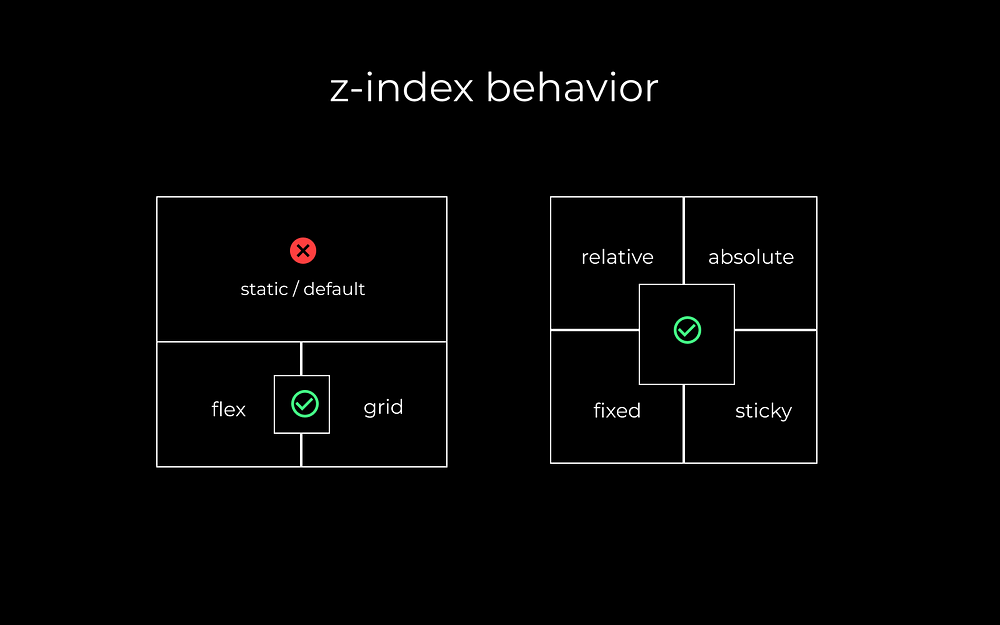
The z-index property sets the z-order of a positioned element and its descendants or flex and grid items*.* Note that when dealing with elements inside flex or grid containers, the z-index can be used to manage their stacking order even if they are static.
Z-order:
This refers to the order of elements along the z-axis, which is perpendicular to the screen. Think of it as layers of paper stacked on top of each other.
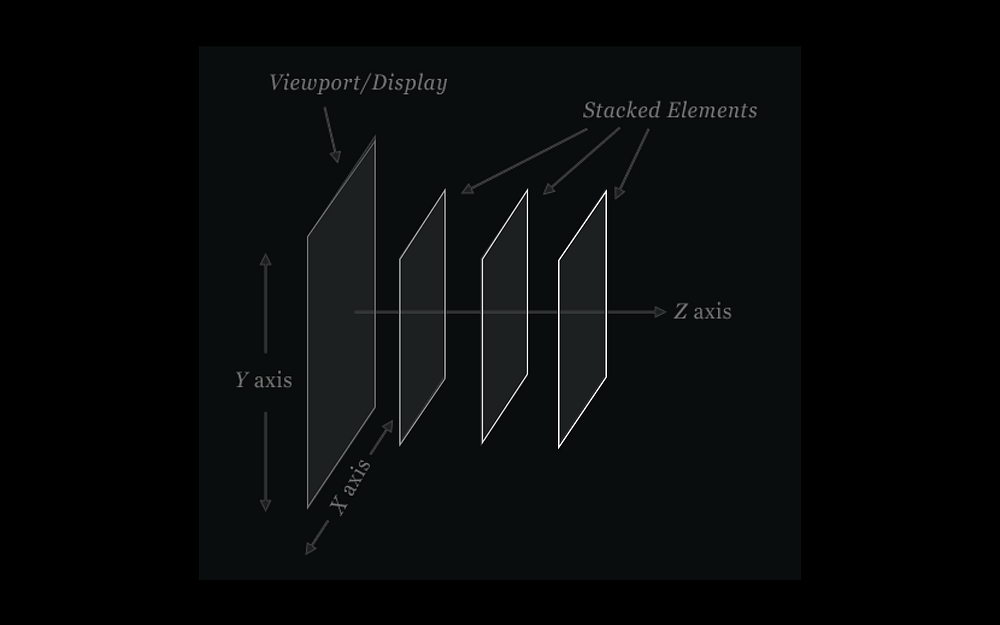
Elements with a higher z-index value will appear above elements with a lower z-index value when they overlap.
Descendants:
The z-index also affects any child elements within the positioned element. This means the stacking order applies not only to the element itself but also to its children.
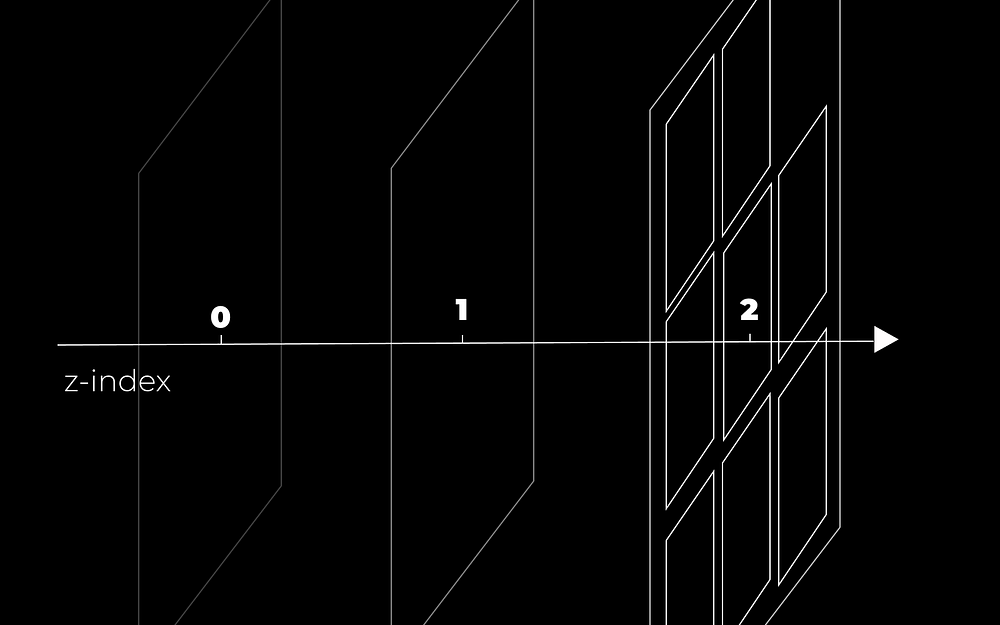
Visual representation of z-index levels: elements with higher z-index values (e.g., 2) along with their children overlay those with lower values (e.g., 0, 1).
In Static Positioning — ‘Z-Index is ignored’
By default, elements are statically positioned, meaning they render in the order they appear in the HTML markup. In this scenario, the z-index property has no effect, and elements are stacked based solely on their position in the DOM tree.
This means that the element appearing later in the DOM tree will consistently appear on top of elements appearing earlier.
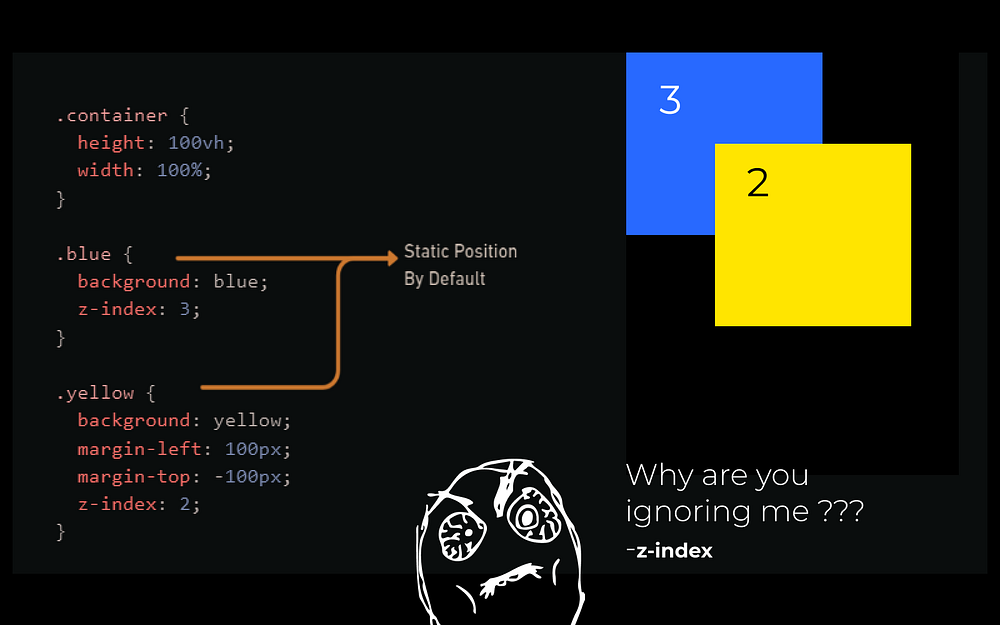
In case of non-positioned elements, the element that appears later in the DOM tree (yellow square) will stay on top regardless of whether the z-index property is set (following the default stacking order).
Positioning other than Static — ‘Z-index works as expected.’
When elements are explicitly positioned using properties like position: relative, position: absolute, position: sticky, or position: fixed, the z-index property comes into play. Elements with a higher z-index value will appear above elements with a lower z-index value.
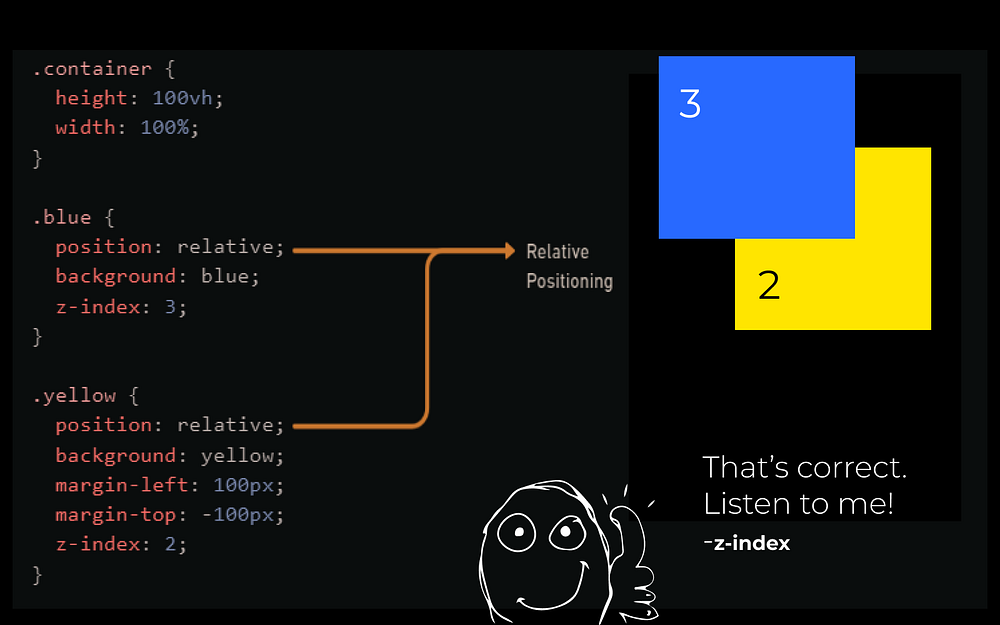
When elements are positioned they must follow the z-index rule so the element with the higher z-index (blue square) value will be on top.
Flex or grid layout container
In flex or grid containers, the stacking order is determined by a combination of factors including z-index, item order, and alignment. Even if the elements are statically positioned, the z-index property will affect their stacking order within the container.
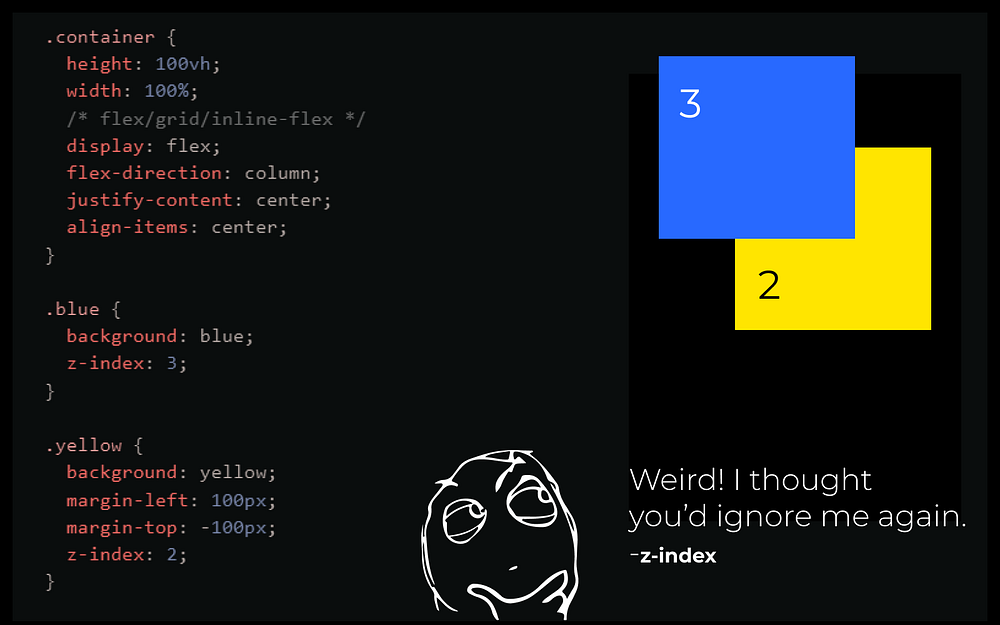
Z-index in flex or grid containers affects stacking order: a blue div with z-index 3 will appear above a yellow div with z-index 2.
Now that we have a basic understanding of the behavior of z-index, let’s take a deeper dive into stacking context, its principles, and how CSS reads or understands the code we write.
What is Stacking Context?
A stacking context in CSS is basically a layer system for elements on a webpage. It determines the order in which elements overlap each other.
Imagine a container holding objects. By default, the order you placed them in is the order they appear in, like a stack of plates. The z-index property is like a special label you can put on some plates. It only matters within the container, and it lets you decide which labeled plates appear on top of others in that specific container.
You can also think of stacking context as a directory system where you can create folders and each folder has its own context. Stacking context can be nested just as you can create a sub-folder inside a folder.
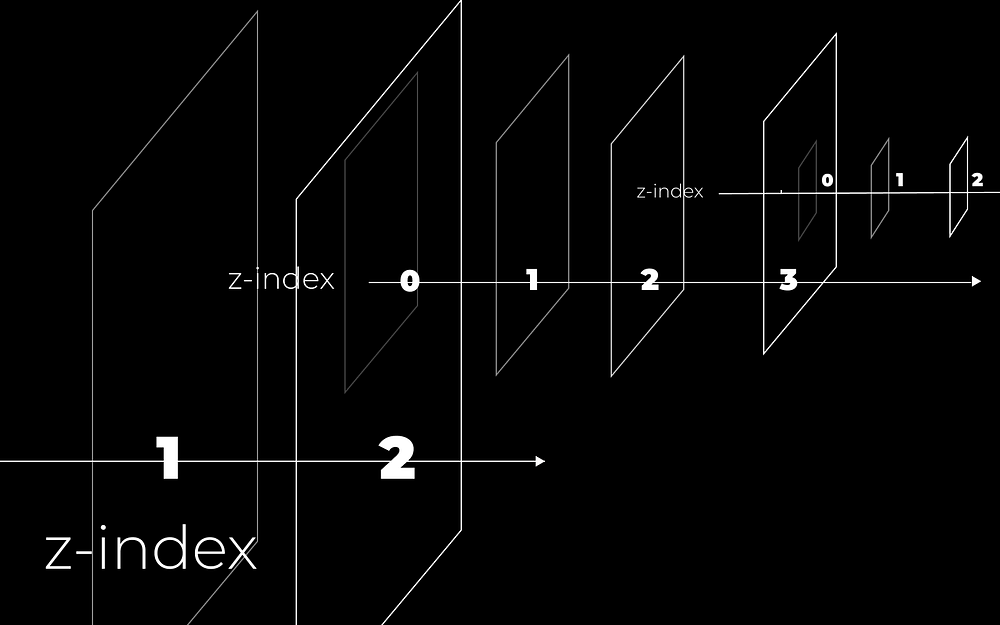
Visualizing CSS Stacking Contexts: Elements with higher z-index values appear above lower ones. Each element can create a new stacking context, similar to how sub-folders nest within folders, isolating their content and z-index.
What creates a new stacking context?
A new stacking context is created in several ways, such as:
- Using certain CSS properties (e.g., position with values other than static, z-index with a value, opacity less than 1).
- Specific elements like or elements with CSS properties like transform, filter, or will-change.
- For the full list, visit this.
Unexpected Hidden UI Elements: A Common Issue arised from misconceptions of stacking context
Consider the following example:
If we style the .circle with a negative z-index and position: relative like shown in the image. The circle disappears. Where did it go? It’s actually hidden behind its parent, the rectangular background.
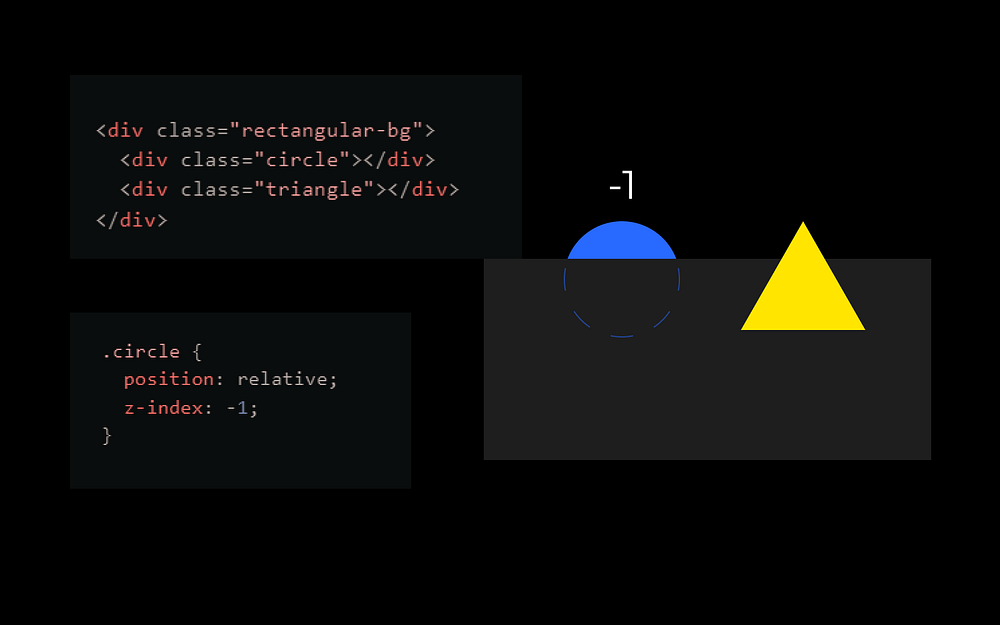
Here’s why: Adding z-index: -1 with position: relative creates a new stacking context for the circle. This new stacking context is a part of the default root stacking context (the entire page).
The z-index property of the circle behaves relative to its parent’s stacking context. Since the parent (rectangular background) does not have a z-index, the circle is rendered behind it.
- Z-index is relative to parent containers
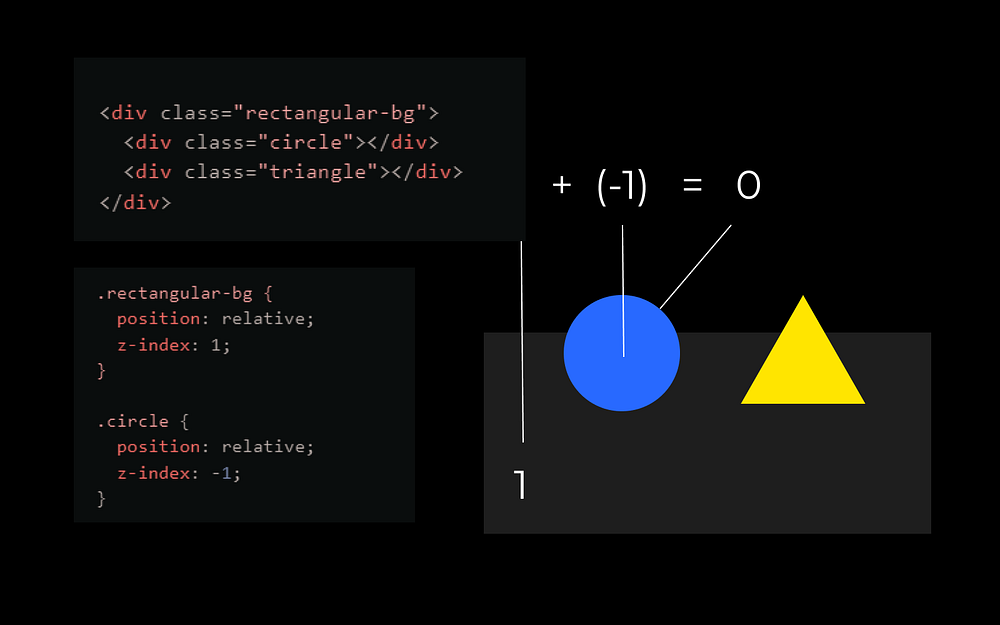
Now, the parent stacking context of the circle is the rectangular background, which has a z-index of 1, so the circle’s z-index is calculated relative to the rectangular background’s stacking context i.e. 1+(-1) = 0.
- Stacking Context using Opacity
I want the circle to be at the top of the triangle. How do I achieve this without z-index?
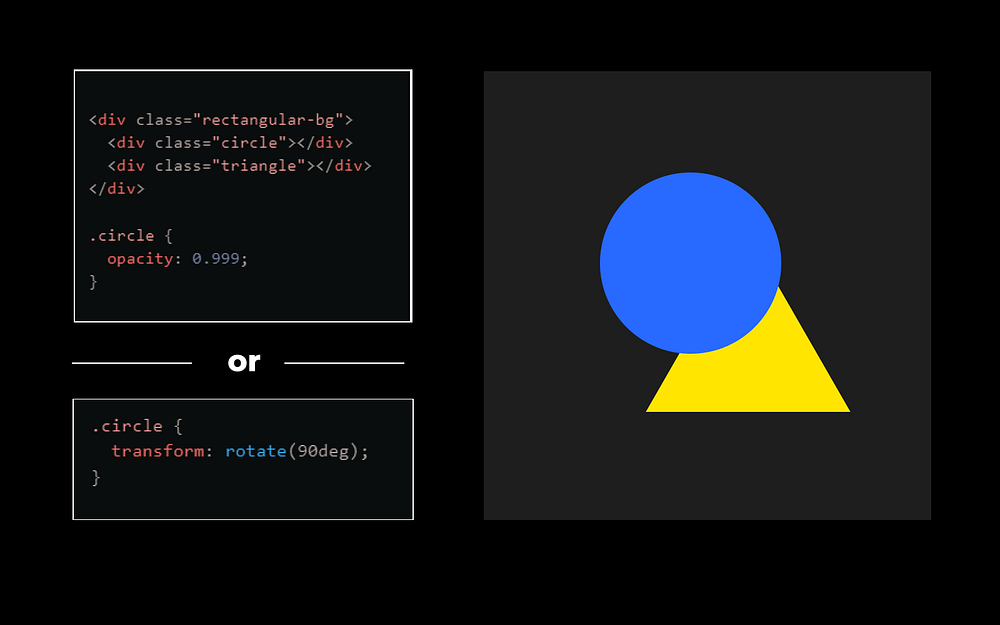
Using Opacity & Transform to Create new Stacking Context
I can do this by setting the opacity less than 1 on the circle or by using a transform property as well. This results in creation of new context as discussed previously. And that’s it. The circle is on top of the triangle.
Let’s dive into some interesting examples of stacking context and behavior of z-index in different complex scenarios.
Stacking Context with Z-index
Let’s assume shapes div has its stacking context defined.
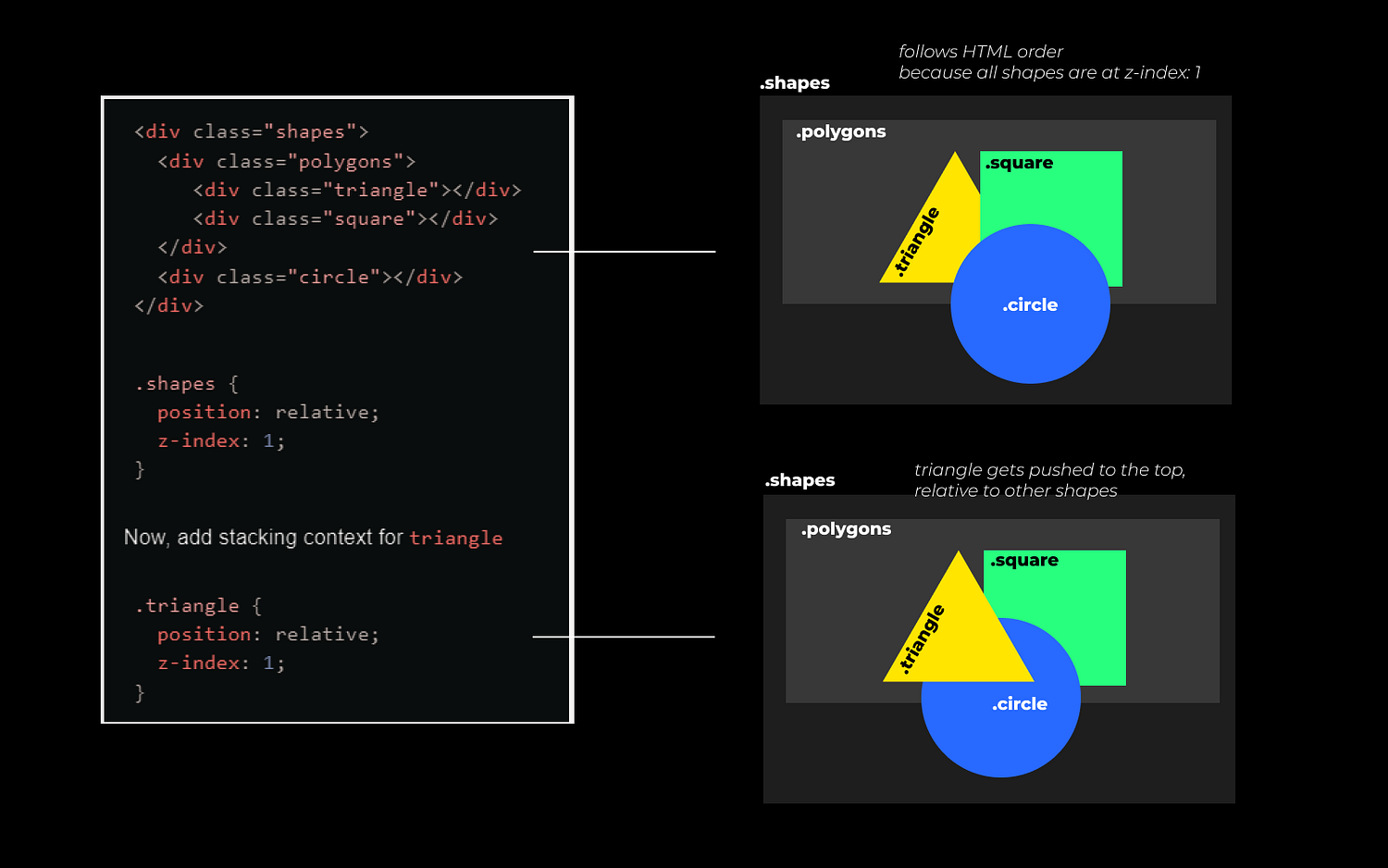
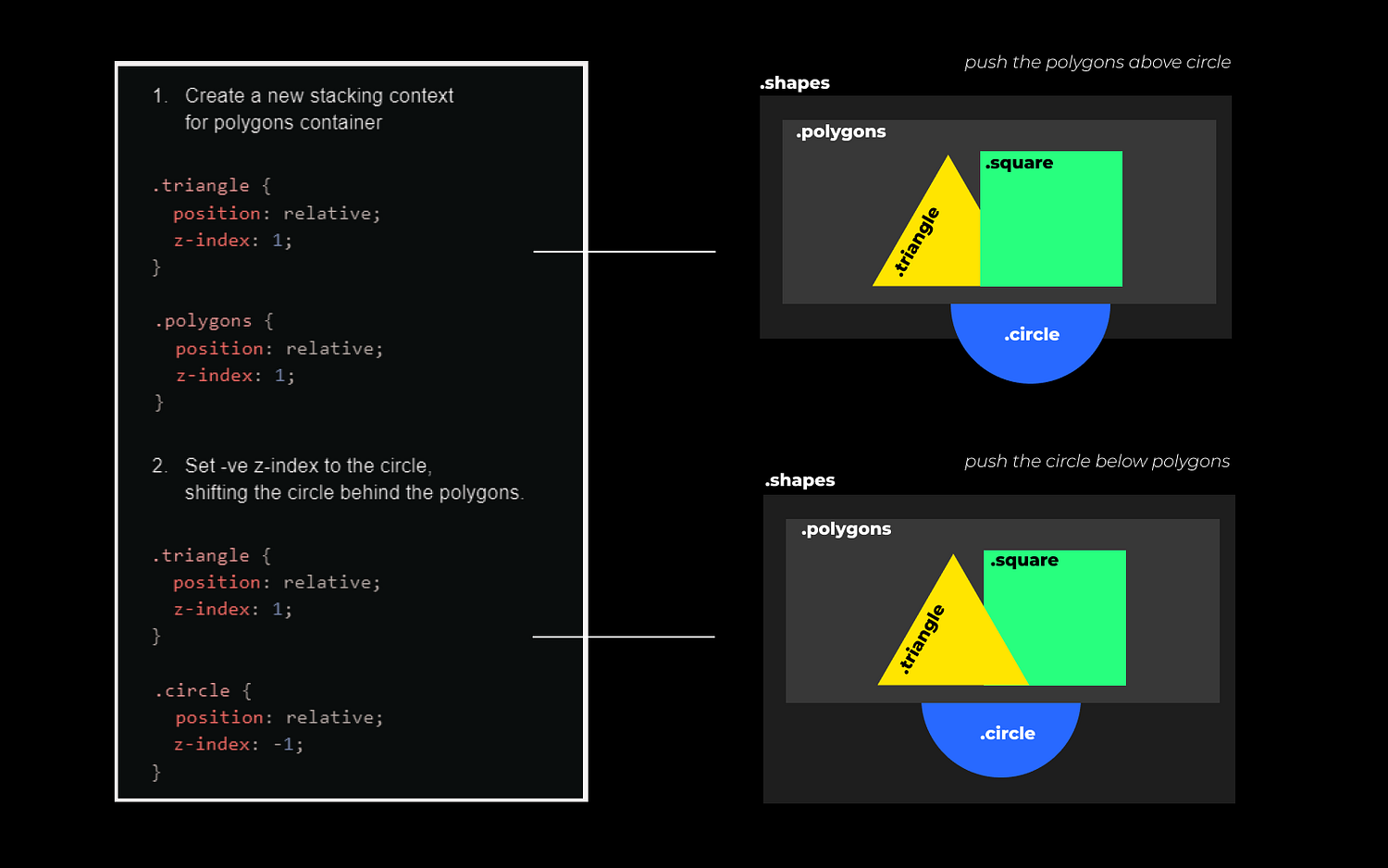
The triangle is now above the square and the circle.
- Above the square, because in relative to shapes, triangle is 1 layer above.
- Above the circle, because the circle has no z-index set and is part of the same stacking context as its sibling polygons i.e z-index of 1 passed on from its parent shapes.
Let’s say we want the triangle above the square but not above the circle. To address this, we can either change polygons z-index or circles z-index. Take a look at the picture below.
In this second example in the image below, the circle has a higher z-index than the square.
If you want the triangle to be in front of the circle, simply setting a high z-index on the triangle (no matter how big the value is) won’t work because the triangle’s z-index only applies within its stacking context (the polygons).
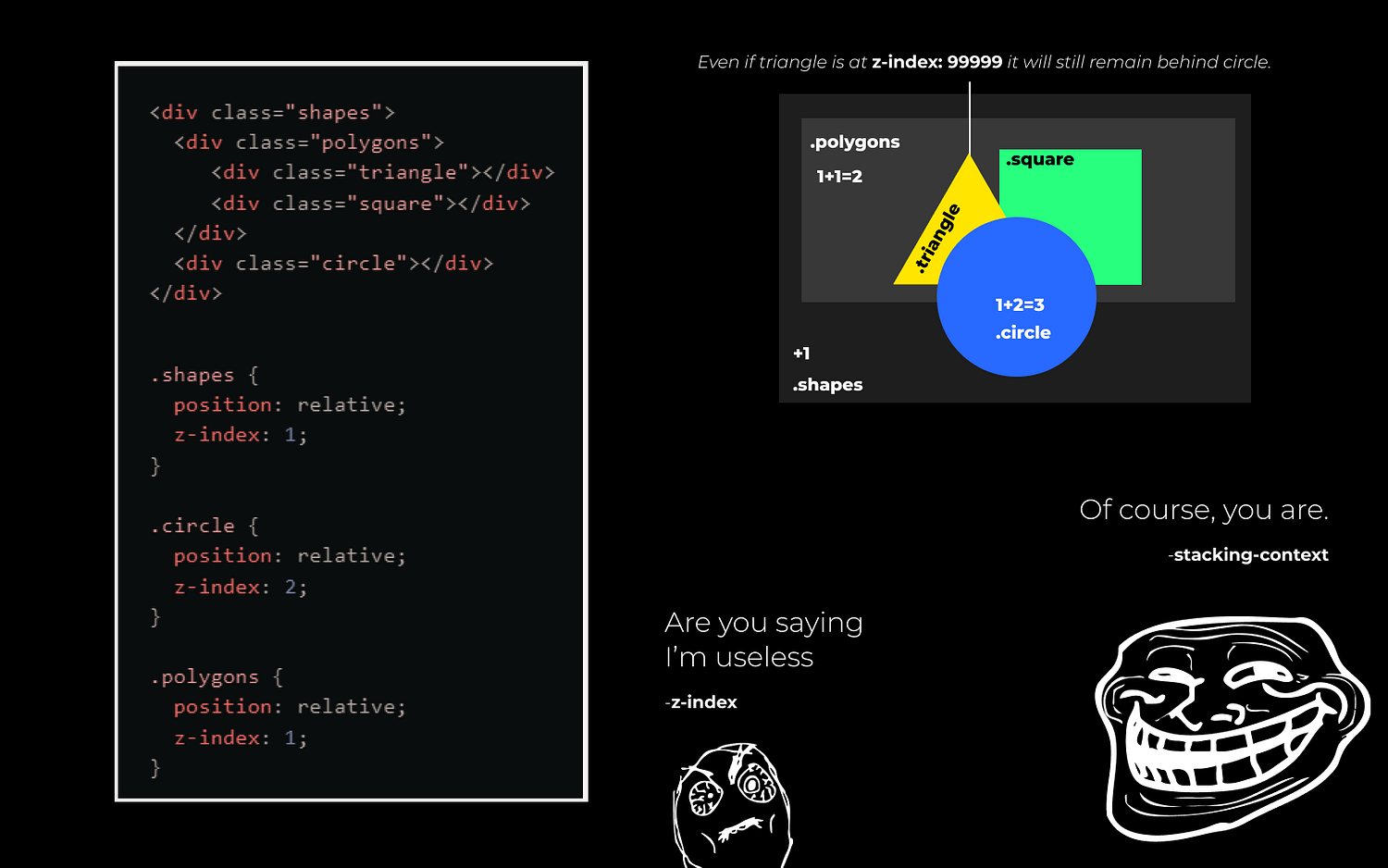
What’s tricky about z-index is that it only works within an element’s stacking context. In our case, we want the triangle, which is a part of the polygon stacking context, to be in front of the circle (another stacking context). This isn’t possible.
To make the triangle appear in front of the circle, we need to remove the stacking context from the polygons.
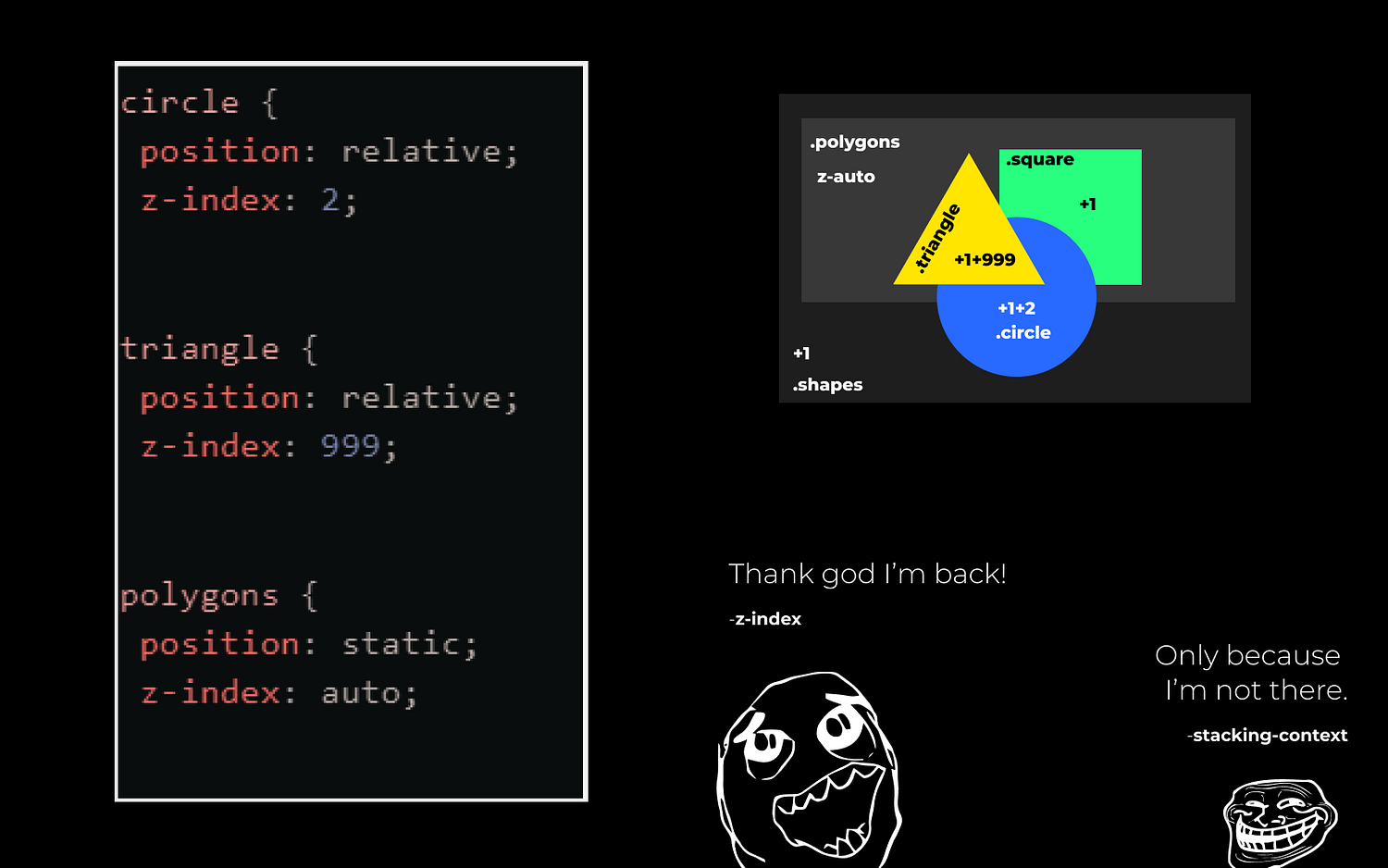
Now, the triangle and the circle share the same stacking context, making it possible for the triangle to appear in front of the circle with a high z-index.
Key Learnings:
- Position Required: The z-index property requires the element to have its position set to relative, absolute, fixed, or sticky.
- Flex and Grid Containers: Within these containers, z-index still controls stacking order, influenced by item order and alignment as well.
- Z-order: This determines the order of elements along the z-axis, with higher z-index values appearing on top.
- Stacking Context: This is a special layer for elements. Elements within the same stacking context can be stacked using z-index, but elements in different stacking contexts cannot influence each other’s stacking order directly.
- Creating Stacking Contexts: New stacking contexts can be created using CSS properties like opacity, transform, filter, and will-change, among others.
Conclusion:
As you can see, CSS can be tricky, and not understanding the nuances of properties like z-index can lead to significant debugging efforts. By knowing how to control the layering of elements properly, you can avoid common pitfalls, save time, and enhance the user experience on your website. Implementing these principles will ensure that your elements are displayed precisely, layered as intended, and contributing to a seamless and engaging visual presentation.
References:
- https://web.dev/learn/css/z-index
- https://developer.mozilla.org/en-US/docs/Web/CSS/CSS_positioned_layout/Understanding_z-index/Stacking_context
- https://ishadeed.com/article/understanding-z-index/
This article extends its gratitude to Subhakar Tikkireddy for reviewing the code samples and other technical content presented in this article.